

What is a dongle?
Basically dongle is a small device that connects/inserts into the computer or other electronic device to give additional functionality or security. It is usually a plug-and-play device that connects with a USB (universal serial bus) port.
How do dongles work?
When you plug a dongle into a universal serial bus, known as a USB port, on your computer. It makes a connection and communicates with the software or hardware it is designed to work with. The dongle then acts as an interference between the computer and the device or software, allowing them to interact between the computer and devices or software’s, allowing them to perfectly interact and exchange data easily.
Common Uses of Dongles
Dongles have numerous applications across different fields. They can be used for hardware protection, such as software license dongles that prevent unauthorized use of the software. They can also be used to provide wireless connectivity, such as WIFI dongles that allow internet access on devices without built-in WiFi capabilities.
Moreover, these dongles can be used for data storage, audio/video transmission, or even as adapters to connect devices with different connectors. When it comes to enhancing connectivity for computer-based devices, these dongles play a very important role by allowing connections that were not possible without them.
Here are some of the common dongle applications:
- Bluetooth Connection:
Dongles can add Bluetooth capacities to devices, allowing them wireless communication with peripherals like headphones, keyboards, and mice.
- Game Controllers:
Special adapters let older game controllers connect to modern systems to protect usability and improve overall gaming experiences.
- GPS Receivers:
Dongles can support GPS functionality, turning a simple device into a navigation tool and improving location-based services.
- SD Card Readers:
These dongles allow devices to read SD cards, assisting in data transfer and extending storage capacity.
- Flash Drives:
USB dongles can act as flash drives, offering convenient data storage and transfer solutions.
- Mobile Broadband Modems:
These dongles provide internet access via cellular networks, crucial for connectivity on-the-go.
- Network Interface Controllers:
Dongles can add Ethernet ports to devices lacking built-in connectivity, ensuring stable and reliable internet connections. By incorporating these functionalities, dongles significantly extend the capabilities of computer-based devices, making them indispensable tools in both personal and professional settings.
Check out Yealink’s best Bluetooth dongles and accessories on our website and get yours before it runs out of stock.
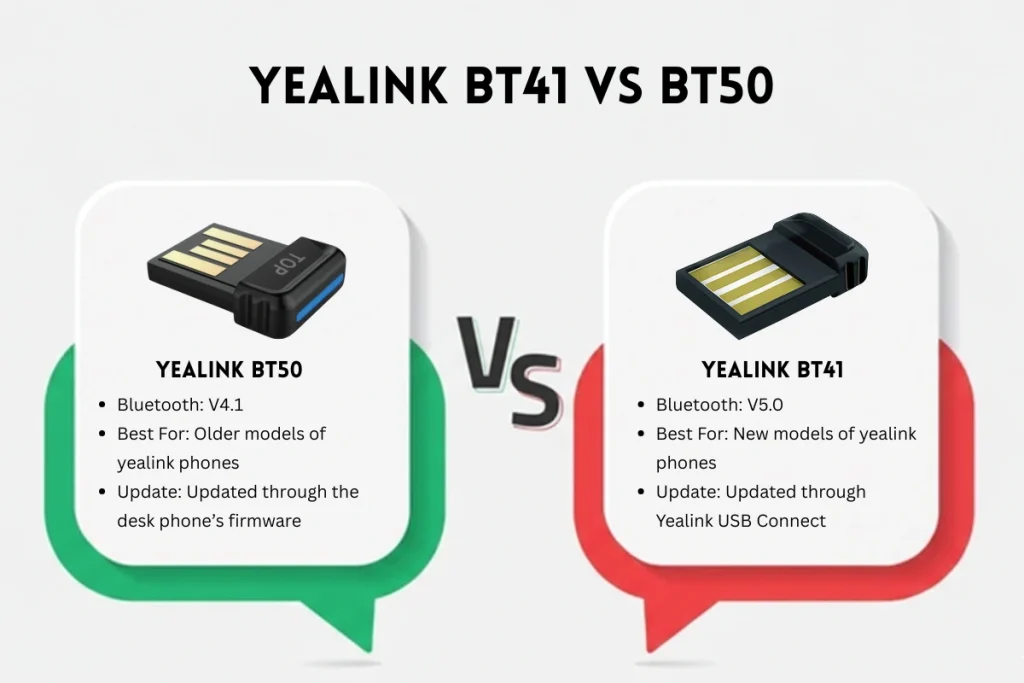
Yealink BT41 Vs BT50
The Yealink BT41 and Yealink BT50 are USB Bluetooth dongles for Yealink desk phones, but the BT41 (Bluetooth 4.1) is more a easier, common adapter, while the more recent one is BT50 (Bluetooth 5.0) gives more better range (up to 100ft) then that of BT41 model, higher fidelity audio (A2DP), and it stress-freely blends with modern headsets and systems, it operates more like a built-in Bluetooth module for computers and phones. For a complete overview of Yealink Bluetooth dongle models, compatibility, and setup options, refer to our Yealink Bluetooth dongle guide.
The key difference between Both:
BT41 links to diverse types of Bluetooth headsets for basic phone calls, on the other hand, BT50 provides exceptional wireless performance for advanced audio and covers longer distances, particularly with newer Yealink devices (because they are designed to work better with BT50 dongle).
Yealink BT41 (Older Standard)
- Bluetooth Version:
V4.1.
- Functionality:
Adds basic Bluetooth connectivity for headsets, supports classic Bluetooth profiles.
- Best For:
Older models of Yealink phones that need a basic wireless headset support.
- Update:
Updated through the desk phone’s firmware.
Yealink BT50 (Newer Standard)
- Bluetooth Version:
V5.0.
- Functionality:
Improved audio quality (A2DP), more excellent range (up to 100 ft), plug-and-play with computers and very compatible phones.
- Best For:
New models of Yealink phones and connecting to computers for unified communications.
- Update:
Updated through Yealink USB Connect (YUC) software.
Which One to Pick?
- For Basic Headset Use on Older Phones:
You can go for the BT41 if you have older phone models and only need simple call control.
- For Smooth and Best Performance & Newer Devices:
The Yealink BT50 is for superior audio, longer range, and compatibility with modern headsets, PCs and systems, especially with newer phone models.
Yealink Bluetooth USB Dongles
Below is the comparison table for you to better understand and easy to choose which one you want for your system and needs.
| Category | Features | BT40 | BT41 | BT50 | BT51 |
| Compatible IP Phone | Bluetooth USB Dongle | Bluetooth USB Dongle | Bluetooth USB Dongle | Bluetooth USB Dongle | |
| Product | Size (L x W x H) | 18 mm X 14 mm X 5.5 mm | 18 mm X 14 mm X 5.5 mm | 18 mm x 13.9 mm x 5.1mm | BT51-A: 18 mm x 13.9 mm x 5.1mm BT51-C: 16.15 mm x 14.5 mm x 9mm |
| Product Type | Port | USB 2.0 | USB 2.0 | USB 2.0 | USB 2.0 |
| Main Features | Bluetooth specification | V4.0+HS system | V4.1 | BT 5.0 | BT 5.0 |
| Operating distance | 10 meters | 10 meters | Up to 100ft/30m | Up to 100ft/30m | |
| Answer incoming calls through Bluetooth headset | ✅ | ✅ | ✅ | ✅ | |
| Terminate calls through Bluetooth headset | ✅ | ✅ | ✅ | ✅ | |
| Adjusts the volume of Bluetooth headset through Bluetooth headset or your phone | ✅ | ✅ | ✅ | ✅ | |
| Visual indicator | ❌ | ❌ | ✅ | ✅ | |
| Network | Bluetooth frequency range | 2.402GHz-2.480GHz | 2.402GHz-2.480GHz | 2400-2483.5MHz | 2400-2483.5MHz |
| Symbol rate | 3Mbps | 3Mbps | 3Mbit/sec | 3Mbit/sec |
Check our main page for more in depth understanding about Yealink Bluetooth dongle, everything that you need to know is explained in detail.
✍️ Author’s Bio
This article is crafted by Spoglink’s Research & Content expert, with a group of technology specialists dedicated to helping U.S. businesses make smarter IT decisions. Our experts collaborate closely with IT managers, system integrators, and hybrid teams to evaluate cutting-edge collaboration tools from brands like Yealink, Grandstream, OWL Labs, Snom, TP-Link, and Ubiquiti Networks. Through hands-on testing in real-world business environments, the team delivers actionable insights and unbiased reviews—empowering organizations to choose the right technology for seamless communication, conferencing, and connectivity.


